


VoClone: AI Voice Changer
4.2519.00 Reviews
App Specs
- Version
- 3.4.15
- Updated On
- License
- Free
- Downloads
- 100,000+
- Developer
- Mobover
- Categories
- Music & Audio
- Platform
- Android
Screenshots
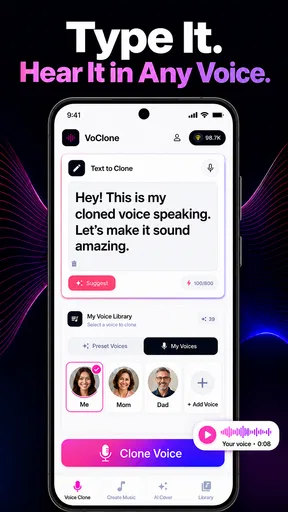
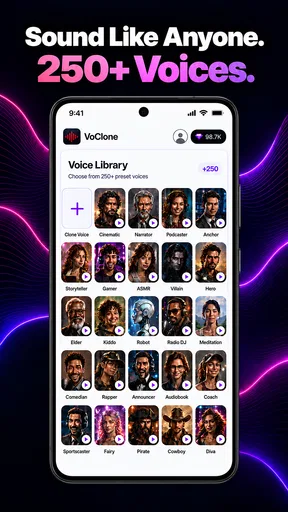
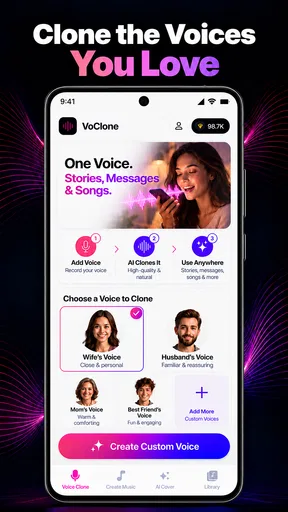
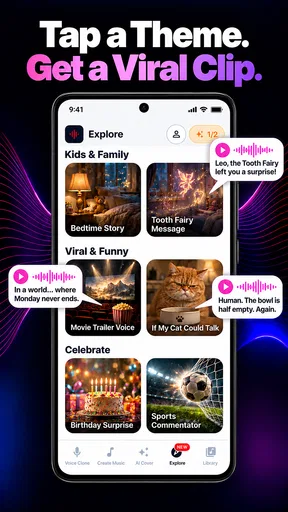
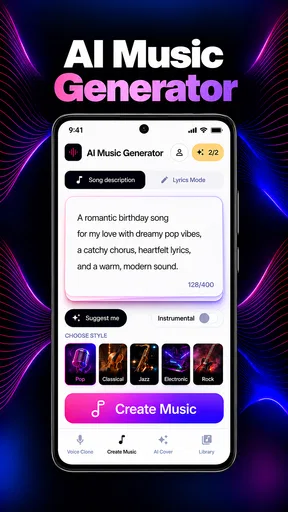
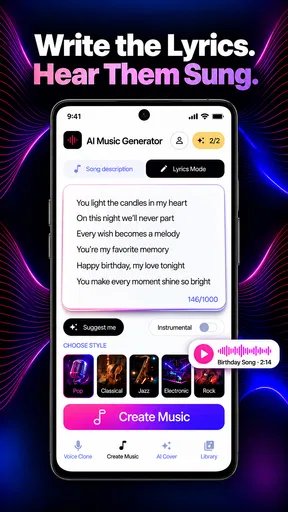
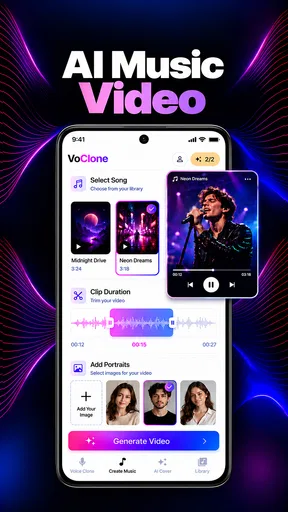
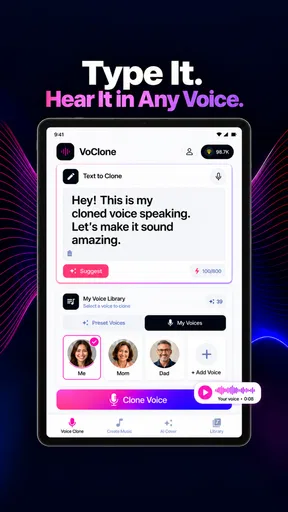
 Analysis by AppCompare
I approached VoClone: AI Voice Changer as a practical music and audio tool rather than a novelty. Its promise is broad: voice cloning, AI covers, song creation, and text converted into different voices. In everyday use, that makes it interesting for someone who wants to experiment with vocals without setting up a full recording studio. It is also the kind of app where the final result depends heavily on the material you give it, so the workflow matters as much as the headline features.
Developed by Mobover, this free app sits in the Music & Audio category and is suitable for Everyone. I found the most useful way to judge it was to follow a complete project from the first idea to the finished audio: start with a short concept, prepare the input, choose a voice direction, generate the result, and then decide whether it is good enough to share or needs another attempt. That process reveals both its creative appeal and the points where expectations need to be realistic.
From a rough idea to a usable voice result
I find the most useful way to approach this section is to treat a voice result as a sequence of small decisions, not a single tap. I’ll look at how a modest starting idea can become easier to assess when I separate the words, source audio, and intended mood. That also sets up the next section’s closer look at preparing each kind of input.
Starting with the right kind of project
The best starting point is not a complicated song with several singers and dense instrumentation. I would begin with something small: a short lyric, a spoken line, a melody idea, or a simple vocal passage that is easy to recognize when the generated version comes back. This gives you a clear reference. If the result sounds wrong, you can tell whether the issue comes from the voice, the words, the melody, or the source recording.
That matters because AI audio tools can make a weak input seem more polished without truly fixing it. A noisy recording, unclear pronunciation, or crowded musical background gives the system less to work with. My practical advice is to prepare the cleanest source you have and keep the first test brief. A short sample is faster to judge, easier to replace, and less frustrating if the first generation misses the intended character.
For a realistic everyday example, imagine making a birthday greeting for a friend. You could write a few lines, turn them into a selected voice, and use the result as a playful audio message. That is a better first project than trying to produce a full commercial-style track immediately. The smaller task lets you learn the controls and understand how much editing your idea needs before committing more time.
The first handoff: preparing words or audio
VoClone can be approached from two directions. You can begin with text when the message is more important than an existing performance, or start from recorded material when you want the generated voice to follow a particular delivery. These are not interchangeable workflows. Text gives you more control over the wording, while an audio source can provide timing, emotion, and phrasing that would be difficult to describe manually.
Worth Reading Before You Choose

EA SPORTS FC Mobile 26 Is a Bigger Football Game, but It Takes Time

Flipboard Shows What News Apps Must Do Beyond the Feed

Switching to Android Auto Means Rethinking Your Driving Routine

Google Calendar Makes a Crowded Week Easier to Manage

Ludo King Makes the Most of the Minutes Between Plans

Baby Panda World Brings Quick Play to Modern Phones, but Its Game Library Feels Busy
When working from text, I would write in short, natural sentences rather than one long block. Punctuation becomes part of the performance because pauses and emphasis are easier to interpret when the wording is clearly separated. I would also read the text aloud before submitting it. If a sentence sounds awkward in my own voice, changing the words first is usually more effective than hoping the AI voice will make it sound natural.
With a vocal source, the handoff is more delicate. The recording should make the intended words understandable, and the musical arrangement should not overpower the voice. This is one of the less obvious trade-offs in an AI cover workflow: a source that sounds exciting to a human listener may be difficult for an automated system to separate or interpret. A simpler vocal take can produce a more dependable starting point than a dramatic but cluttered recording.
Choosing a voice without losing the purpose
The voice choice should follow the project, not the other way around. A voice that sounds amusing in a quick test may be a poor fit for a calm narration, while a voice that seems ordinary on its own may work better inside a song. I recommend deciding what the listener should feel first: playful, warm, dramatic, casual, or polished. Then judge the generated result against that goal instead of choosing the voice that sounds most impressive in isolation.
This is especially important for AI covers. The novelty of hearing a familiar style performed by a different voice can be entertaining, but the effect becomes distracting if the pronunciation, timing, or emotional tone does not match the song. I would treat the voice as one element of the arrangement rather than expecting it to carry the entire track. If the melody and words are already busy, a more restrained voice may produce a clearer result.
For text-to-voice work, it is useful to prepare alternate versions of the same line. One version can be conversational, another more concise, and a third can use punctuation to create longer pauses. This is a practical way to compare delivery without rewriting the whole project. It also helps identify whether the voice itself is the problem or whether the sentence structure is making the output sound unnatural.
Generation is a review stage, not the finish line
Once the input and voice direction are ready, the generated audio should be treated as a draft. I would listen with headphones first, then play it through the phone speaker. Headphones reveal small issues in pronunciation and transitions, while the speaker gives a better sense of whether the result remains understandable in an ordinary setting. A voice that sounds impressive in isolation may become muddy when heard alongside music or background noise.
The most useful listening test is to compare the result with the original intention, not with an imaginary perfect studio recording. Ask whether the words are clear, whether the emotional tone is appropriate, and whether the voice fits the rhythm. If all three are acceptable, the result may already be useful for a personal project. If only one is working, another generation with a better source or shorter text is likely to help more than repeatedly changing random settings.
One advanced habit I found valuable is keeping the creative stages separate. First decide on the words. Then test the voice. Only after that should you judge the musical context. Changing all three at once makes it impossible to learn from the outcome. Separating them turns the app from a button you press repeatedly into a small production workflow where each attempt teaches you something.
Moving the result into the real world
The handoff after generation is where the app’s practical value becomes clear. A generated clip might become a message, a rough song demo, a voice sample for a personal project, or a playful piece of content. The important question is not simply whether the sound is technically interesting, but whether it survives outside the app. Can another person understand it? Does it suit the length of the message? Does it need trimming or additional editing before it is ready?
I would avoid building an entire project around one generated take. Save or retain the strongest version of the wording and the voice direction so you can recreate the idea if needed. This is particularly useful when experimenting with covers, where a small change in the source performance can alter the result considerably. Keeping the process organized prevents a promising outcome from becoming difficult to reproduce.
There is also a creative handoff between the AI output and the listener’s expectations. If you present the clip as a quick experiment, imperfections can feel part of the fun. If you present it as a finished song or serious narration, the same imperfections become much more noticeable. My recommendation is to match the presentation to the result. VoClone is at its strongest when used for ideas, personal audio, and playful transformations rather than when treated as a replacement for every part of a professional recording process.
What the finished result does well
The clearest strength is speed of experimentation. Instead of needing separate recording software, vocal processing knowledge, and a large collection of tools, you can explore a voice-based idea in one focused app. That makes it approachable for beginners who want to hear a concept rather than study audio production first.
The combination of voice cloning, AI covers, song creation, and text-to-voice work also gives the app more range than a basic voice changer. You can begin with written words, move toward a musical performance, or use an existing vocal idea as the starting point. I especially like that this supports different creative personalities: some users think in lyrics, others in melodies, and others in spoken performances.
Its audience size suggests that the concept has found interest, with over one hundred thousand installs and an average rating of 4.2 from around three thousand seven hundred ratings. Those figures do not replace personal testing, but they do indicate that the app is not limited to a tiny experimental audience. Mobover has positioned it as a tool ordinary mobile users can explore without paying upfront.
Where the workflow breaks down
The first weakness is that the app’s broad promise can encourage oversized projects. “Create a song” sounds simple, but a convincing song involves lyrics, timing, arrangement, vocal expression, and editing. If you expect one generation to solve all of those decisions, the experience may feel inconsistent. I would use the song feature as a sketching and experimentation tool unless the output already meets your quality expectations.
Voice cloning also deserves a careful, responsible approach. Only use voices and recordings you have the right to use, and avoid presenting an AI-generated performance as if a real person approved it when they did not. This is not merely a technical concern; it affects trust. The more realistic the output sounds, the more important it becomes to be transparent with the people who hear it.
Another point of friction is the cost structure. The app is free to start, but it includes in-app purchases ranging from $4.99 to $99.99 per item. For casual users, that means it is sensible to test the basic experience before committing to a larger purchase. Someone who only wants an occasional joke or short greeting may find a free trial workflow sufficient, while a frequent creator should think carefully about how often the app will actually be used.
The app’s current version is 3.4.14, and it supports devices running Android 7.0 or later. That makes it accessible to many older Android phones, although audio generation can still feel more comfortable on a newer device with a good speaker or headphones. I would also leave room for repeated attempts rather than planning a project around a single quick pass.
Who should use it, and who should look elsewhere
I would recommend VoClone to beginners who want to explore AI voice creation without assembling a complicated toolkit. It is a good match for short personal projects, humorous messages, early song ideas, voice experiments, and creators who enjoy comparing several interpretations of the same words. It can also suit someone who has lyrics but no confidence in recording their own vocal performance.
It is less suitable for a user who needs precise studio control, detailed vocal editing, or a predictable professional master. In those cases, a conventional digital audio workstation with manual recording and mixing tools is the better choice. A standard text-to-speech app may also be preferable when the only goal is clear narration and musical or character-based experimentation would be unnecessary.
I would also skip it if your main requirement is absolute consistency across a long project. Short clips are easier to evaluate and correct. Longer pieces expose changes in pronunciation, emotion, and timing that can make the result feel assembled rather than continuous. For a podcast, audiobook, or serious release, I would want a workflow with stronger control over every line and edit.
My practical recommendation after using the full workflow
My preferred method is simple: write a short test, prepare a clean source if I am using audio, choose a voice based on the intended mood, generate several focused drafts, and listen both privately and in the situation where the clip will actually be played. I would change only one major variable at a time. That approach saves effort and makes the app’s strengths easier to recognize.
I would also keep the first project deliberately modest. A short greeting, chorus idea, or spoken sample can show whether the voice suits your taste before you invest more attention or explore the paid options. If that small result works, expand the idea gradually. If it does not, the problem may be the input or the project’s ambition rather than the entire app.
Overall, I see this as a creative playground with practical uses, not a complete replacement for traditional audio software. Its best results come from thoughtful preparation and realistic expectations. The free entry point makes it easy to try, while the broad set of voice and song experiments gives curious users plenty to explore. Just remember that the final quality depends on the handoff between your idea, your source material, the generated voice, and the way you present the finished audio.
For me, that balance makes it worth recommending to the right person: someone who wants to turn a lyric, message, or rough vocal idea into something listenable with minimal setup. If you need deep production control or guaranteed consistency, choose a more traditional audio workflow instead. If you want fast, approachable experiments with voices and AI covers, Mobover’s app is a convincing place to begin.
Pros
- Offers a wide range of AI voice styles for different creative uses.
- Voice conversion works quickly
- making short edits easy to produce.
- Useful for adding character voices to videos
- messages
- and social content.
- Simple interface helps beginners explore voice effects without much setup.
- Can make ordinary recordings more entertaining and expressive.
Cons
- Voice quality can vary noticeably between effects and recording types.
- Natural-sounding results may require clear audio and careful pronunciation.
- Some features or voice packs may be restricted behind a subscription.
- Processing longer recordings can take more time and consume extra data.
- Generated voices may not always preserve the speaker’s emotion accurately.
FAQs for VoClone: AI Voice Changer
What is VoClone: AI Voice Changer and what can it do?
VoClone: AI Voice Changer is an entertainment and audio-editing app designed to transform recorded or imported speech with artificial-intelligence voice effects. Depending on the available tools and voice library, you can experiment with different character styles, tones, and vocal identities, then preview or save the result. It is mainly intended for creative clips, jokes, gaming content, and social media projects rather than professional voice replacement.
Is VoClone: AI Voice Changer free to download and use?
The app may be available to download at no initial cost, but some voice effects, processing options, exports, or advanced features can require in-app purchases or a subscription. Before confirming a trial or payment, check the pricing screen carefully, including renewal terms and whether the subscription is billed weekly, monthly, or annually. Availability and prices can also vary between Android and iOS.
How do I create a voice recording with VoClone?
After opening VoClone, you generally record a short voice sample or import an existing audio file, choose one of the available AI voice effects, and start the conversion process. Clear speech usually produces better results than noisy recordings, music, or overlapping conversations. Processing time can depend on the length of the clip, your device, and the app’s internet connection requirements.
Does VoClone work offline, and what permissions does it require?
Some basic recording or playback functions may work on the device, but AI voice conversion can require an internet connection if audio is processed through remote servers. The app may request microphone access for recording and storage or media access for importing and saving files. Grant only permissions that match the feature you want to use, and review the privacy policy before uploading personal or sensitive recordings.
Can I use VoClone-generated voices in videos or commercial projects?
You should not assume that every generated voice can be used commercially or to imitate a real person. Usage rights may depend on the selected voice, your subscription, the app’s license agreement, and the platform where you publish the content. Avoid misleading audiences, impersonating individuals, or creating fraudulent audio. For monetized videos, advertisements, or client work, review VoClone’s current terms and obtain permission when required.


